
It's month-end, the system says there are hundreds of tonnes left in the gravel stockpile, and at a glance the heap looks smaller. A warehouse stocktake means measuring or counting what is really in each warehouse at a fixed date and time, comparing it with the stock you get by adding receipts and subtracting issues, and explaining the difference before correcting it. Below you will find what to prepare, the steps in order, the mistakes that throw the count out, and how it is done with CargoGest.
What a warehouse stocktake is when you sell by weight
At a loading centre there are two stock figures. The theoretical one comes from the delivery notes: opening stock, plus goods-in delivery notes, minus goods-out ones, plus or minus transfers between warehouses. The actual one is what you measure in the stockpile, the silo or the shed on the day of the count.
The stocktake is there to compare the two and adjust the theoretical figure to the actual one. If you sell bulk material (aggregates, cereal, wood chip, salt, scrap), the theoretical figure depends on every lorry having gone over the weighbridge and generated its delivery note. If you dispatch palletised goods, it depends on every outgoing delivery note having the correct units.
What you need to prepare before counting
If you count without preparing, you end up with a figure you won't be able to explain. Have this to hand before heading out to the yard:
| What | Where it comes from | What it is for |
|---|---|---|
| List of items by warehouse | The management software or the stock sheet | Knowing what has to be counted in each place and not missing any stockpile |
| Stock at the cut-off date | Goods-in and goods-out delivery notes and transfers up to that time | Having the theoretical figure to compare against |
| Pending delivery notes | Weighbridge and office | Closing off lorries that were weighed but have no delivery note |
| Measuring criterion for bulk material | Whatever your company uses (surveying, stockpile volume, silo counts) | Always measuring the same way so one month can be compared with another |
| Weighbridge status | Latest verification certificate | Knowing that the weights on the delivery notes are valid |
The weighbridge is on the list for a practical reason: non-automatic weighing instruments must be verified every two years, and if the deadline passes they cannot be used for commercial transactions until they pass verification. It is explained in the post on the periodic verification of the truck weighbridge.
How to do a warehouse stocktake step by step
1. Set the cut-off date and time
Choose a moment with no loading, for example Saturday afternoon or the last day of the month at closing time. Everything weighed before that time counts towards the theoretical stock; anything weighed after it counts in the following month. Let the weighbridge know so that nobody issues a backdated delivery note.
2. Close off pending delivery notes
Check the lorries that have entered the weighbridge and have no delivery note, supplier receipts that have not been recorded, and cancelled delivery notes that have not been reissued. A single inbound lorry with no delivery note means several tonnes that show up in the stockpile but not in the software.
3. Record transfers between warehouses
If you move material from one plant to another, or from the shed to the yard, that movement has to be recorded as an issue from one warehouse and a receipt into the other. Without a transfer, one warehouse shows a surplus and the other a shortfall, and the total only balances by chance.
4. Measure or count what is in each warehouse
Go round the warehouses in the same order as the item list. For palletised goods, count units or pallets. For bulk, apply the criterion you have set and note how you measured each stockpile: if you calculate in cubic metres and sell in tonnes, always convert using the same criterion and write it down.
- One person measures and another records, if possible.
- Note the warehouse, the item, the quantity and the unit.
- Flag doubtful stockpiles (mixed, wet, half-loaded) so they can be reviewed afterwards.
5. Compare with the stock at the cut-off date
Put the counted figure and the theoretical one side by side for each item. Calculate the difference in quantity and, if it helps, as a percentage of what has gone out during the period. A small difference on an item that moves a lot of tonnage can be normal; the same difference on an item that barely moves deserves a search.
6. Explain the difference, then adjust
Before correcting the stock, look for the cause. If you find a delivery note that was never issued, issue it; if it is a forgotten transfer, record it. Whatever remains unexplained after that review is the difference that gets adjusted with the stocktake, and it is worth noting why.
The stocktake adjustment corrects the figure, but the reason for the difference is still there. If the same item is short every month, the problem lies in how that material enters or leaves the weighbridge.
Common mistakes that throw the stock out
- Weights keyed in by hand. One digit changed on an outgoing delivery note throws off the stock and the invoice at the same time.
- Outdated tare weights. If a lorry changes body or rig and its old tare keeps being used, every net weight comes out wrong. The post on double weighing or stored tare explains when each method suits best.
- Counting while loading is under way. If a loader keeps loading while you measure, the count no longer corresponds to the cut-off time.
- Changing the measuring criterion from one month to the next: the differences stop being comparable.
- Unrecorded losses. With materials that lose moisture or degrade, part of the difference is physical; the post on weight-based control of biomass goods in and out shows how to deal with them.
- Transfers between plants jotted down on paper that never reaches the office.
If at your weighbridge the weight is copied by hand onto the delivery note or transfers are noted on paper, that is where these discrepancies begin. In CargoGest the weight goes from the weighbridge to the delivery note without keying it in, and every goods-in and goods-out delivery note moves the stock of its warehouse: request a demo with an example from your loading centre and see it with your own items.
How it is done with CargoGest
CargoGest keeps stock by warehouse based on the same delivery notes that are issued at the weighbridge. It reads the gross weight, tare and net weight from the truck weighbridge, stores each vehicle's tare and allows double weighing, so the issue that deducts stock is the one shown on the display. Purchases come in with goods-in delivery notes weighed on the weighbridge, so the other side of the equation also comes from the weight.
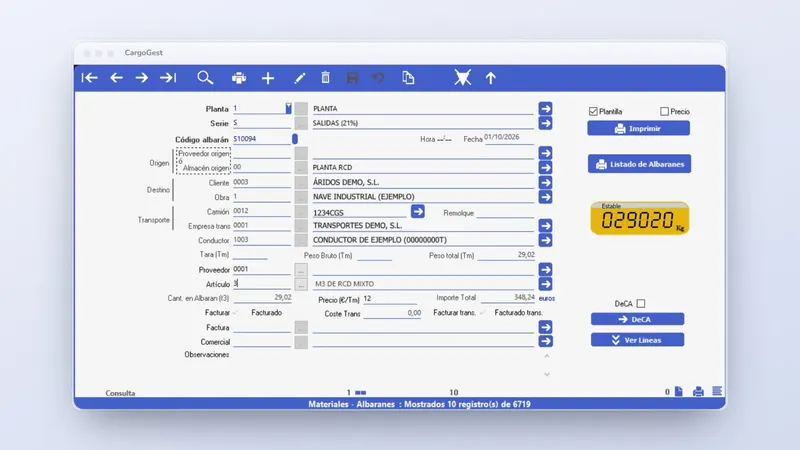
For the count, CargoGest has items by family, stock by warehouse, stocktakes, stock at a given date and transfers between warehouses. Stock at a given date gives you the theoretical figure exactly at the cut-off time, even if you do the count days later. If you work with several plants, the warehouses are synchronised with the head office and you can see everything from there; the multi-warehouse software page explains it in detail.
Once the stocktake is closed, the month's delivery notes are invoiced in batch and the accounting is exported to ContaPlus, A3, Aficonta or Monitor Informática. If you are coming from another program, data migration is included in the quote; before switching, check which history is worth taking with you in the post on changing weighbridge software without losing your history.
How to read the count differences
This table helps you decide what to do with each difference before adjusting it:
| What you see | Likely cause | What to do |
|---|---|---|
| Surplus material in the stockpile | Supplier receipt with no delivery note or unrecorded transfer | Look in the weighbridge records for the period's inbound lorries |
| Material missing | Issue with no delivery note or wrongly calculated net weight | Review cancelled delivery notes and the tares used |
| One warehouse has a surplus and another is short by the same amount | Transfer between warehouses not recorded | Record the transfer with its date |
| Always short on the same item | Physical loss or measuring criterion | Note the loss and review how it is measured |
| Differences on every item at one plant | Doubtful weighbridge weights | Check the weighbridge verification |
What to do now for your next stocktake
- Set now the cut-off date and time for the next close and the criterion you will use to measure each stockpile.
- Before that date, go over the pending delivery notes, the transfers between warehouses and the weighbridge verification certificate.
- After the count, note the cause of each difference so you don't repeat it next month.
If you want the theoretical stock to come from the same delivery notes weighed on the weighbridge, with stock by warehouse and at a given date, request a CargoGest demonstration with your own loading centre or call +34 959 54 07 12.